

Transforming medical images into clinical insights.
- Virsafeed
Diagnostic imaging has become a central part of modern healthcare, supporting diagnosis, treatment planning, follow-up care, and multidisciplinary collaboration. As imaging volumes increase and healthcare systems become more digital, the need for reliable, easy-to-use, and compliant software has grown rapidly. A Diagnostic Imaging Software (DICOM) Viewer and Marker Application helps medical teams open, review, annotate, and manage diagnostic images in a structured and efficient way.
For healthcare organizations working in regulated environments, especially GxP settings, the value of such a solution goes beyond image viewing. It must also support traceability, data integrity, access control, validation readiness, and workflow consistency. In this article, we will explore what a DICOM viewer and marker application is, why it matters, what features it should include, and how it supports both clinical and operational excellence.
What is a DICOM Viewer?
DICOM stands for Digital Imaging and Communications in Medicine, which is the standard used to store, share, and display medical images across healthcare systems. A DICOM viewer is software that allows users to open and interpret these images in a usable format.
Unlike a basic image viewer, a DICOM viewer is designed specifically for healthcare imaging data. It can handle modalities such as X-ray, CT, MRI, ultrasound, and other diagnostic image types. It also supports image series, metadata, and display functions that help clinicians make informed decisions.
In simple terms, a DICOM viewer software acts as the bridge between raw medical imaging data and the healthcare professional who needs to review it accurately.
What is a Marker Application?
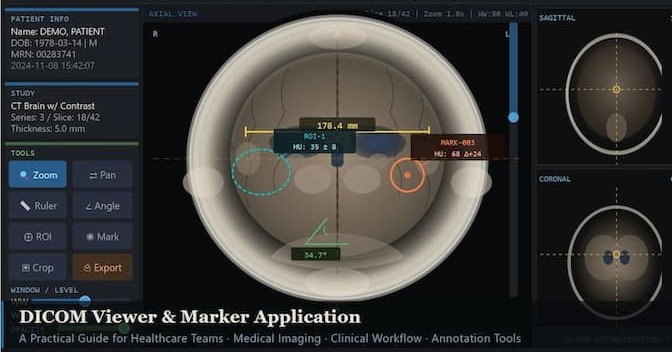
A marker application adds annotation and measurement capability to the DICOM viewer. It allows users to draw arrows, highlight areas, measure distances and angles, add text notes, and mark findings directly on the image.
This is especially useful during radiology review, surgical planning, teaching, consultation, and case discussion. A marker tool helps standardize how findings are documented and communicated. Instead of relying only on verbal descriptions or external notes, the image itself becomes a more informative clinical record.
For beginners, this means the software is not just for viewing. It is also for observing, documenting, and communicating important clinical details more effectively.
Why this software matters in healthcare
Medical imaging plays a major role in modern diagnosis and treatment. Delays, poor image handling, or inconsistent annotation can affect both clinical quality and operational efficiency. A strong diagnostic imaging viewer improves the workflow by making image review faster, clearer, and more collaborative.
In a GxP environment, these benefits become even more important. Healthcare and life sciences organizations must pay close attention to controlled processes, data integrity, auditability, and documentation. Software used in such environments should be designed with compliance expectations in mind from the beginning.
A well-implemented DICOM viewer and marker application supports:
- Faster image access.
- Better clinical collaboration.
- Standardized annotations.
- Improved traceability.
- More reliable review workflows.
- Stronger operational control.
Core features of a DICOM viewer and marker application
A practical and effective DICOM viewer software should offer a strong set of features that support both clinical users and operations teams. The most valuable capabilities usually include the following.
1. DICOM image rendering
The software should load and display DICOM files accurately and quickly. Image quality should remain clear and clinically useful across different modalities.
2. Image navigation tools
Users should be able to zoom, pan, rotate, invert, scroll through series, and compare multiple images. These functions help clinicians review scans in detail.
3. Marker and annotation tools
A marker application should allow arrows, circles, freehand drawing, text labels, measurements, and region highlighting. These features are important for identifying findings and documenting observations.
4. Measurement capabilities
Length, angle, area, and distance measurement tools are essential for clinical review. They support more objective assessment and better consistency.
5. Patient and case management
Images should be organized by patient, study, modality, and case. A structured interface helps users find the right file quickly and reduces confusion.
6. Access control and security
Role-based access ensures that only authorized users can view, edit, or annotate data. Security is especially important in regulated healthcare systems.
7. Audit trail and traceability
The system should track user actions such as viewing, marking, editing, exporting, and logging in. This supports compliance and accountability.
8. Integration readiness
A good solution should be able to work with PACS, HIS, EMR, or other healthcare information systems. Interoperability improves workflow continuity.
9. Export and sharing
The software should support controlled export of images, reports, and annotations when needed for review or consultation.
10. Performance and usability
Even the best features lose value if the interface is slow or difficult to use. A clean design, intuitive layout, and responsive performance are essential.
Benefits for healthcare organizations
A diagnostic imaging viewer and marker application delivers several practical benefits across clinical, operational, and compliance functions.
First, it improves clinical efficiency by making image access and review faster. This matters when teams work under time pressure and need to make timely decisions.
Second, it supports better communication among radiologists, clinicians, surgeons, and trainees. Marked images are easier to discuss than unstructured verbal descriptions.
Third, it enables standardization. When all users follow the same annotation and review workflow, results become more consistent and easier to interpret.
Fourth, it strengthens documentation and traceability, which is highly important in GxP environments. Clear audit trails and controlled actions help support quality expectations.
Fifth, it improves training and knowledge transfer. New users can learn faster when they can see marked examples, measurements, and annotated case notes.
Considerations for GxP environments
When implementing this type of software in a GxP environment, the focus must extend beyond functionality. The system should be developed and deployed with validation, control, and operational reliability in mind.
Key considerations include:
- Clear user and functional requirements.
- Risk assessment for critical workflows.
- Validation planning and traceability.
- Data integrity and secure storage.
- Controlled access and authentication.
- Change management and release control.
- Documentation for testing and implementation.
- Ongoing support and maintenance procedures.
As a senior project manager in a regulated environment, this is where the value of structured requirement management becomes clear. The software must work well for users, but it must also stand up to operational scrutiny and quality expectations.
What beginners should look for
For someone new to this field, the most important thing is to understand that not all imaging software is the same. Some tools are simple viewers, while others are built for serious clinical and enterprise use.
A beginner should look for software that is:
- Easy to use.
- Clinically meaningful.
- Secure and compliant.
- Fast and stable.
- Designed for real workflows.
- Supported by clear documentation.
- Ready for integration and scaling.
If the software is being used in a hospital, research, or regulated healthcare setting, validation and traceability become especially important. In those situations, a feature-rich application is not enough. It must also be dependable and controlled.
Real-world relevance
A DICOM viewer and marker application is used across many healthcare functions. Radiology teams use it to review scans. Surgeons may use it for planning and pre-operative discussion. Trainers may use it to explain findings to residents and new staff. Operations teams may use it to support structured image workflow and reporting.
This is why the product should be designed with both the end user and the system owner in mind. Good software does not simply display images. It improves how people think, work, document, and collaborate.
Final thoughts
Diagnostic Imaging Software (DICOM) Viewer and Marker Application is an essential part of modern healthcare technology. It supports image review, clinical annotation, communication, and decision-making in a structured way. In regulated environments, it also contributes to traceability, quality, and operational control.
For healthcare organizations, the right solution can improve efficiency and standardization. For beginners, it provides a practical entry point into imaging workflows and digital healthcare systems. For project and operations leaders, it represents a product that must be thoughtfully designed, carefully implemented, and consistently maintained.
If you are building, managing, or implementing this type of solution, the key is to balance user experience with control, speed with compliance, and innovation with reliability. That is what makes a DICOM viewer and marker application truly valuable in today’s healthcare landscape.
Know the Author
Hey there, readers! Welcome to my little corner of the internet. I ain’t just your average blogger — I’m a seasoned project manager with a knack for diving deep into research and unraveling the mysteries of project management. But that’s not all there is to me! With a background in Healthcare, IT and Pharmaceuticals for Project management, hospital management and a passion for travel, hiking, and trekking, I’m all about blending the professional with the adventurous. So, join me on this voyage where we’ll explore the ins and outs of strategy, project management and share tales from the management, travels, and maybe even swap tips along the way.
Feel free to visit my site to know more about my researched output in the form of blogs: http://www.virsafeed.com/
Would you like to connect with me? Please drop me an email at virsafeed.com@gmail.com